erp.li POS: a native Odoo point of sale that keeps selling offline
A native Android point of sale app that connects directly to your Odoo. Keep selling when the internet drops, and every offline order syncs to Odoo automatically the moment the connection returns. Built for shops, retail and hospitality.
Community, Enterprise or Odoo.sh • Arabic and English • Configured from Odoo
Offline
Sell without internetAuto sync
Orders reach Odoo automaticallyCamera scan
No barcode scanner neededArabic
Full right-to-left interfaceWhy use erp.li POS instead of Odoo POS in the browser?
Odoo POS in a browser works well on a counter PC. On a phone or a small tablet at a busy till, a native app removes the everyday friction.
Opens straight into selling
The cashier taps an icon and starts selling. No browser, no address to type, no tabs to lose and no page to reload.
Built for internet drops
Products, customers and images are stored on the device, and offline orders wait safely on the device until they sync to Odoo on their own.
The camera is your scanner
Scan barcodes and QR codes with the phone camera, or find a product by saying its name. No extra hardware to buy.
Receipts without a printer
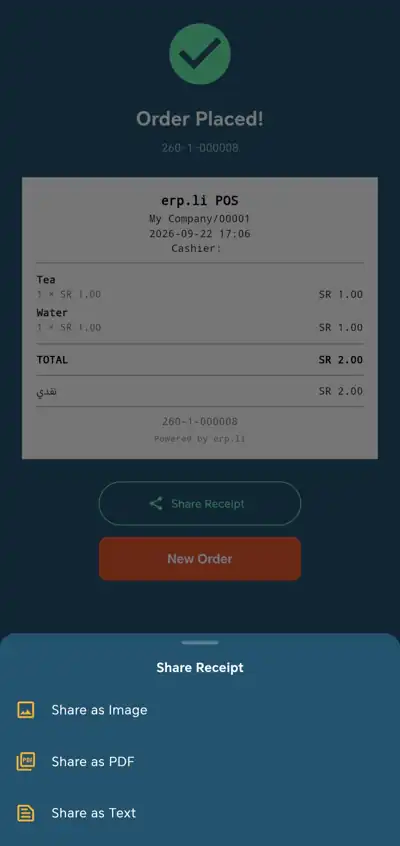
Send the receipt to the customer on WhatsApp as an image or a PDF in one tap, straight from the till.
Designed for small screens
A touch interface made for phones and small tablets, in Arabic or English, so staff learn it in minutes.
Still your Odoo
Products, prices, payment methods and cashiers all come from your Odoo POS settings. Every sale lands in the same Odoo you already use.
See it in action
A real point of sale, built around the cashier.
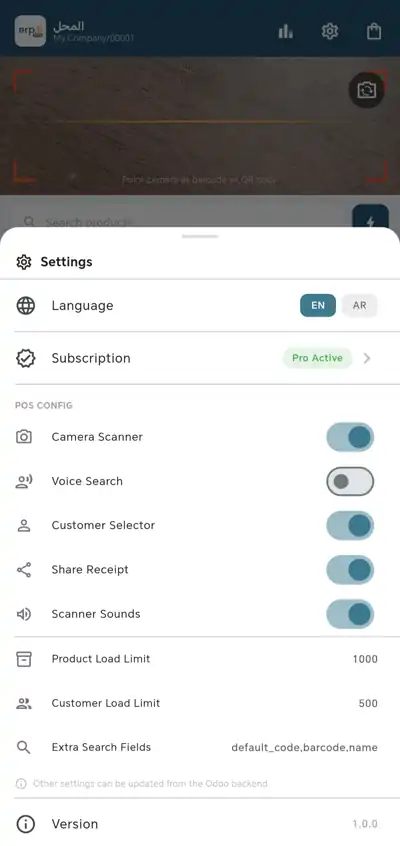
A complete point of sale on any Android device
Everything a cashier needs at the counter, connected live to your Odoo products, customers and payment methods.
Online and offline selling
Products, customers and images are cached on the device when the session opens. Offline orders are saved locally and synced to Odoo as soon as the connection returns.
Fast checkout
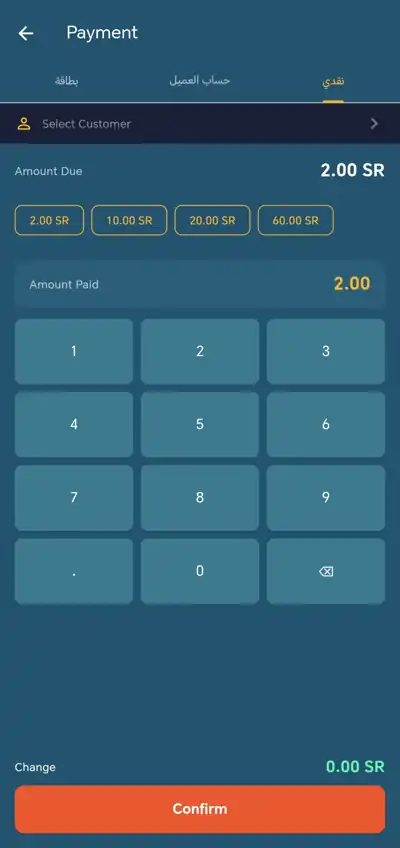
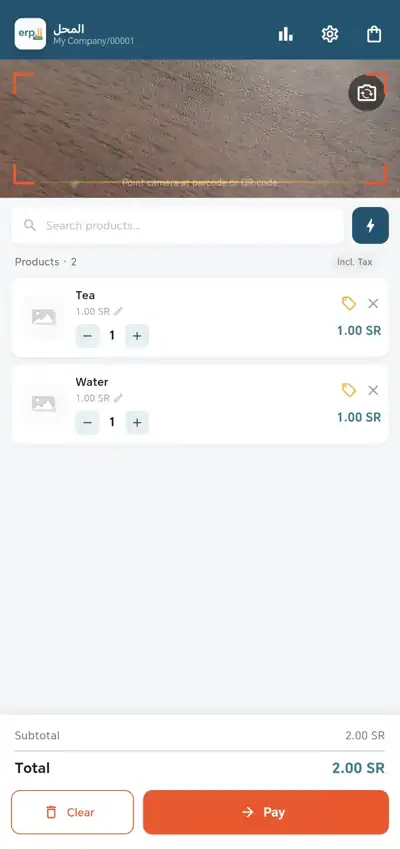
Add products in one tap, change quantities and prices, apply item or order discounts, pick variants such as size or color, and take cash with quick amount buttons.
Scan and voice search
Scan EAN-13, QR codes or internal references with the device camera, or say the product name to find it instantly.
Flexible payments
Accept cash, card, bank transfer or any payment method configured in your Odoo POS, with change calculated automatically for cash.
Receipts on WhatsApp
Share every receipt by WhatsApp, email, Telegram or any app on the device, as an image, a PDF or plain text.
Print through your device
Print receipts to any printer your Android device already supports through its built-in print service, or share them digitally instead.
Multiple cashiers with PIN
When employee login is enabled in Odoo POS, each cashier signs in with a personal PIN, and manager and cashier roles follow your Odoo settings.
Several points of sale, one license
Run a shop, a café or any other counter as separate Odoo points of sale from the same database. One license covers them all.
Customers at hand
Search and assign customers to orders. Recent contacts are preloaded for offline use, and a default customer can be selected automatically on every new order.
Controlled from Odoo
Turn the camera scanner, voice search, customer selector, receipt sharing and product load limits on or off from your Odoo POS settings. Nothing to configure on the device.
Session summary and orders
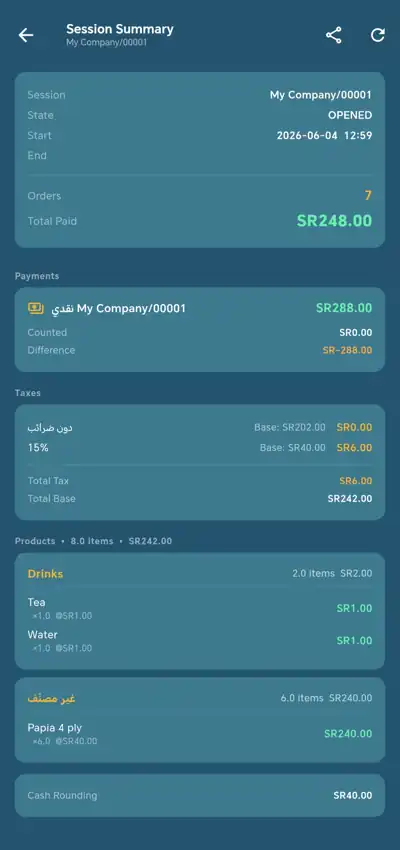
See payments, taxes and sales by category for the current session, share the summary in one tap, and review every order with its total.
Your sales data stays with you
erp.li POS signs in with your existing Odoo credentials. No customer data, sales data or Odoo records are ever sent to third parties. Your license is managed using only your Odoo server address, database name and database ID.
- ✓ Works with Odoo 17, 18 and 19
- ✓ Community, Enterprise or Odoo.sh
- ✓ Arabic and English, switch from the login screen
- ✓ Data encrypted in transit
Simple pricing for small shops
Try every feature free for 90 days, then pay one yearly price for your Odoo database, whatever the number of devices.
erp.li POS license
SAR 299 per database per year
- ✓ 90 days free with every feature
- ✓ Unlimited devices on the same database
- ✓ All features included, no add-ons
- ✓ All updates during your subscription
Prices in Saudi Riyals. Running more than one Odoo database? Contact us.
Frequently asked questions
How much does erp.li POS cost?
Every Odoo database starts with a 90-day free trial with all features. After that, the license is SAR 299 per database per year, covering unlimited devices, all features and updates.
Why use the app instead of Odoo POS in the browser?
The app opens straight into selling, keeps working when the internet drops, uses the phone camera as a barcode scanner and sends receipts on WhatsApp. It is built for phones and small tablets at a busy till, while everything still comes from your Odoo.
Can I use it on more than one device?
Yes. The license is tied to your Odoo database, identified by its address, name and unique ID, not to the device. You can install the app on as many devices as you need.
Can I run more than one point of sale?
Yes. You can open sessions for several Odoo points of sale, such as a shop and a restaurant, from the same app. One license covers the whole database.
Can I print receipts?
Yes. The app prints through the Android built-in print service, so it works with any printer your device can already print to. You can also share receipts on WhatsApp, by email or through any app.
Can I keep selling when the internet is down?
Yes. Products, customers and images are stored on the device when the session opens. Orders made offline are saved locally and synced to Odoo automatically when the connection returns.
Which Odoo versions does it support?
Odoo 17, 18 and 19, on Community, Enterprise or Odoo.sh.
Is my sales data shared with anyone?
No. Customer and sales data stay between the device and your Odoo server. Only your Odoo server address, database name and database ID are used to manage the license.
Turn any Android device into an Odoo point of sale
90 days free • Offline selling • Receipts on WhatsApp
Get it on Google PlaySee the Odoo mobile apperp.li POS is an independent application and is not affiliated with or endorsed by Odoo S.A. Odoo is a trademark of Odoo S.A.