E-Invoicing in Saudi Arabia: The Complete Guide to ZATCA Requirements
Everything you need to know about both phases, invoice types, the technical requirements for integrating with the Fatoora platform, and penalties - written from real integration work with Saudi businesses.
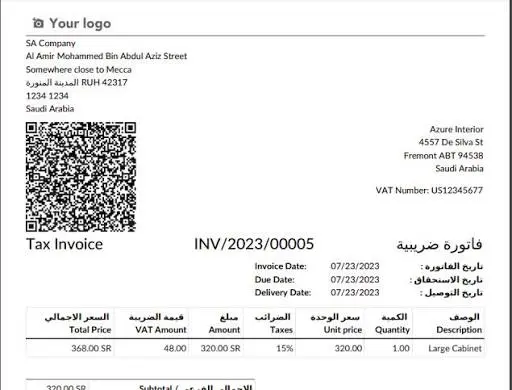
What is e-invoicing, and who has to comply?
E-invoicing means issuing tax invoices in a structured digital format through a system that meets the requirements of the Zakat, Tax and Customs Authority (ZATCA), instead of paper invoices or Word and Excel files. It is mandatory for every business registered for VAT in the Kingdom, as well as anyone issuing invoices on their behalf. The requirements come in two phases: Phase One (Generation and Storage), which already applies to everyone, and Phase Two (Integration and Linkage), which is rolled out in successive waves based on a business annual revenue.
Phase One versus Phase Two
The most common misunderstanding among business owners is assuming that producing a PDF invoice from any software is enough. The table below shows the real difference.
| Item | Phase One - Generation and Storage | Phase Two - Integration and Linkage |
|---|---|---|
| What is required | Issue the invoice electronically and store it digitally | Connect your system directly to the Fatoora platform |
| Format | Any structured electronic format | XML following the UBL specification defined by ZATCA |
| Digital signature | Not required | Required - cryptographic stamp and an approved certificate |
| QR code | Required on simplified invoices | Required, and must carry the signature and public key |
| Submission to ZATCA | None | Real-time clearance for tax invoices, reporting within 24 hours for simplified ones |
| Who it applies to | All businesses | Waves based on annual revenue thresholds |
Read more: is your business in scope for Phase Two, and when?
The two invoice types and when to use each
Picking the wrong type is one of the most frequent causes of rejection during a first integration.
Standard Tax Invoice (B2B)
Issued when selling to another VAT-registered business or to a government entity.
- Goes through clearance: sent to ZATCA and approved before it reaches the customer
- Must include the buyer VAT number and address
- Cannot be handed to the customer before it is cleared
Simplified Tax Invoice (B2C)
Issued when selling to an end consumer - restaurants, retail, point of sale.
- Handed to the customer immediately, without waiting for ZATCA
- Reported to ZATCA within 24 hours of issue
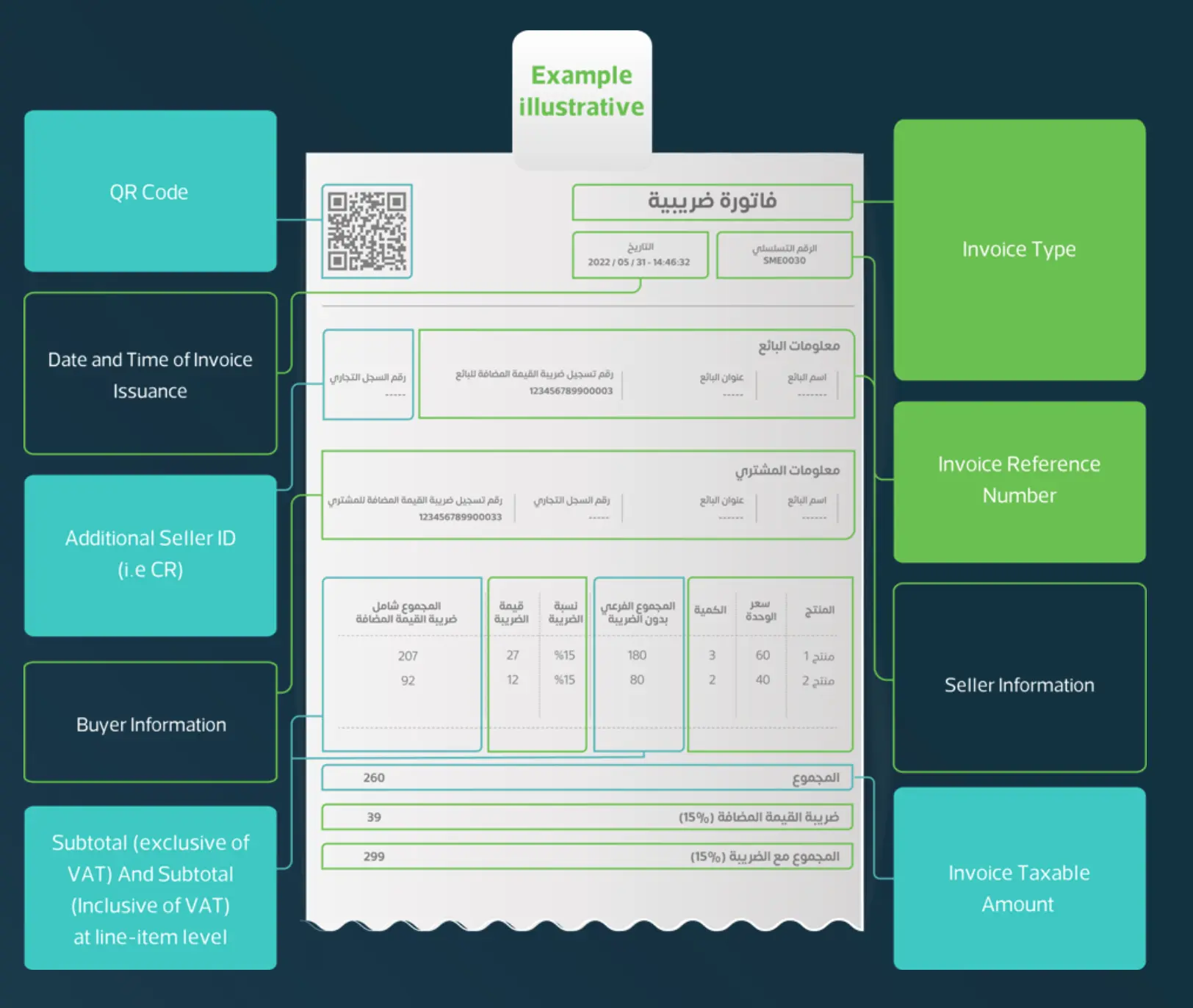
- Must carry a machine-readable QR code
Technical requirements for Phase Two
Conforming XML file
Every invoice is generated as an XML file following the ZATCA specification. A missing field or wrong ordering causes rejection.
Cryptographic stamp and certificate
A digital signing certificate (CSID) issued from the Fatoora portal for each invoicing unit, renewed periodically.
Unique identifier (UUID)
A unique reference for every single invoice that is never reused.
Previous invoice hash
Each invoice is chained to the one before it. Breaking the chain halts issuing entirely.
Conforming QR code
Carries the seller name, VAT number, timestamp, total, VAT amount, and the signature.
Local archiving
Invoices must be stored inside the Kingdom and made available for review on request.
The path to compliance in six steps
Confirm your compliance date
Check your revenue against the announced wave thresholds, and expect ZATCA official notice well ahead of your integration date.
Choose a conforming system
Make sure the system genuinely supports Phase Two, not just PDF generation. Some vendors only unlock Phase Two on higher tiers.
Clean up your business data
VAT number, commercial registration, national address with postal code. Gaps here are the single biggest cause of a failed first integration.
Issue your signing certificate
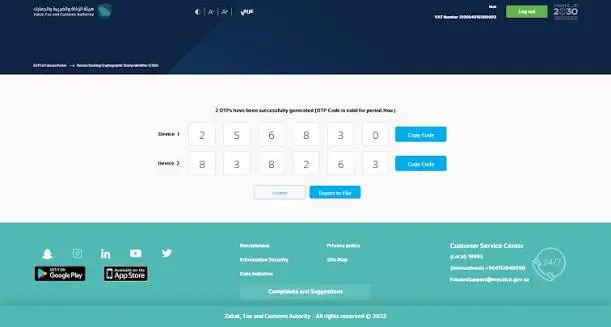
From the Fatoora portal: register the invoicing unit, generate the certificate request, and use the OTP code to obtain the certificate.
Test in the simulation environment
Do not move to production until you can submit every document type successfully: standard invoice, simplified invoice, credit note, debit note.
Go live and monitor
Track the status of every invoice for the first two weeks, and put a clear process in place to handle rejections within hours, not days.
Detailed guides for each part
Each link leads to a practical walkthrough with screenshots and fixes.
Frequently asked questions
Want a ZATCA-ready system without the headache?
Hosted Odoo, prepared for Phase Two - 14-day free trial, no credit card
Start Your Free Trial View PlansDisclaimer: this guide is for general information and does not replace the official publications of the Zakat, Tax and Customs Authority. Requirements and deadlines change periodically - always check the latest announcements from the Authority.
Not sure where to start?
Tell us what you need and our team will come back to you within 24 hours with a clear plan and a transparent quote. No obligation.