Short answer: most ZATCA failures in Odoo never reach ZATCA at all. They are caught by pre-submission checks, onboarding limits, or the invoice chain. Knowing which of the three layers you are stuck in tells you the fix immediately. This guide walks through every failure point in Odoo Saudi e-invoicing integration, in the order they occur.
Where Odoo surfaces ZATCA errors
Before troubleshooting anything, know where to look. Odoo reports these failures in three separate places, and people routinely search the wrong one:
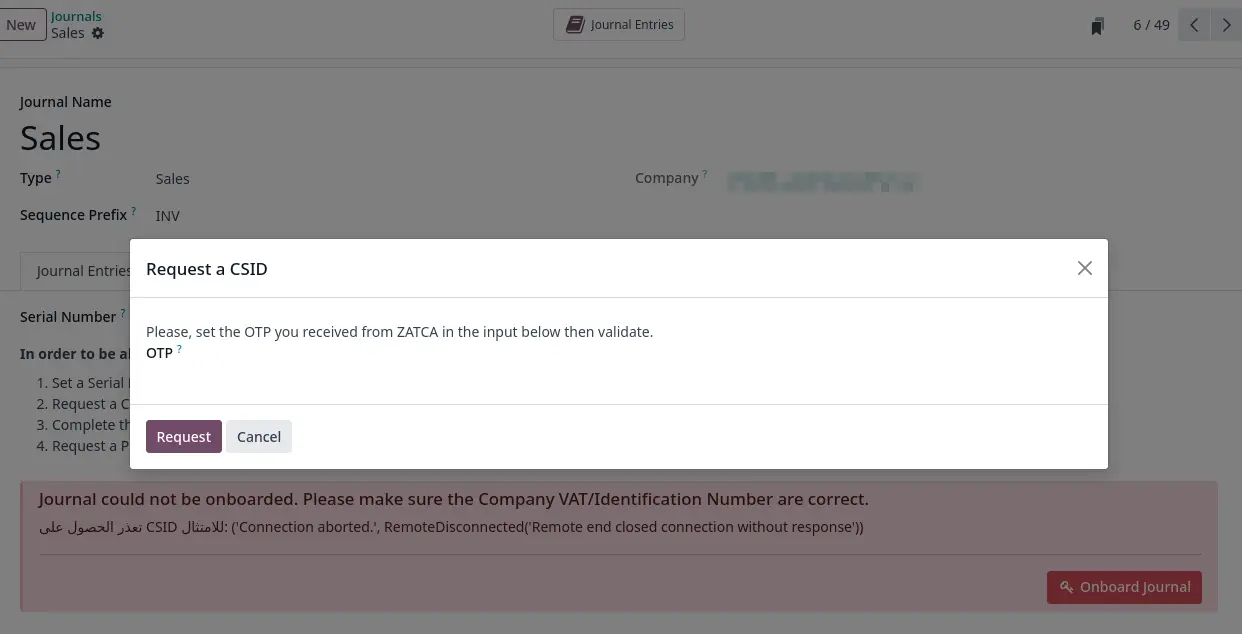
- The onboarding wizard on the journal. All certificate and CSR problems appear here, not on the invoice.
- The invoice EDI status and chatter. Validation failures and submission responses, including the raw rejection payload.
- The POS dialog shown to the cashier. Point of sale errors never appear in the back office at the moment they happen.
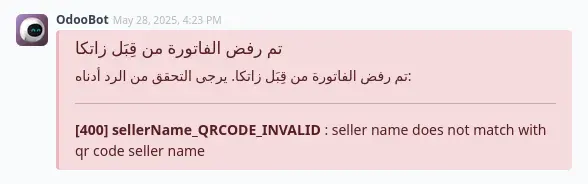
1. The chain block, where one invoice freezes everything after it
This is the failure that surprises people most, and the one worth understanding before anything else.
ZATCA requires every invoice to be chained to the one before it through an incrementing counter value. Odoo enforces this strictly: invoices are submitted in strict order on each journal. If one invoice gets stuck, most often because a submission timed out and was marked as excepted rather than failed, every invoice created after it on that journal stops moving. Nothing is broken, nothing is rejected. They simply queue behind the stuck one.
How to identify it
Odoo tells you directly. The invoice carries a chain head reference and the interface exposes a Blocking Invoice link that takes you straight to the culprit. If you see a message about the invoice being blocked due to an earlier one, do not touch the invoice you are looking at.
Fix
Go to the blocking invoice and resolve that one. Once it clears, the queue drains on its own. Attempting to fix the downstream invoices individually wastes hours and changes nothing.
2. Clearance or reporting, decided by the customer record
A large share of confusing submission responses trace back to a single field that has nothing to do with the invoice itself.
Odoo chooses the submission route from the Company Type on the customer record. A customer set as Individual produces a simplified invoice sent through the reporting endpoint. A customer set as Company produces a standard invoice sent through the clearance endpoint. There is no separate setting on the invoice.
Set this wrong and the document goes to the wrong endpoint, producing redirect responses that look like a network or configuration problem when the real cause is one dropdown on the partner form. If a specific customer fails consistently while everyone else works, check their Company Type before anything else.
3. Onboarding and the CSR
The onboarding step generates a certificate signing request, and it is the most error-prone part of the whole setup.
The 64-character limit
Certificate request fields are bound by a hard 64-character ceiling that comes from the certificate standard itself, not from Odoo. Long company names, particularly full Arabic legal names with the entity type spelled out, exceed it and the request fails. Shorten the value used in the certificate fields. It does not have to match your printed letterhead exactly.
The generic message problem
Several unrelated failures during onboarding all surface as the same non-specific error. Because the message tells you nothing, work through the causes in order of likelihood: field length limits, an OTP that has already been used or expired, a journal left in a half-configured state from a previous attempt, and mismatched company data between Odoo and the ZATCA portal.
OTP handling
The one-time password from the Fatoora portal is short-lived and single-use. Each journal needs its own. Requesting one, getting interrupted, and coming back later is the single most common reason onboarding fails on the second attempt.
Half-configured journals
If onboarding fails midway, the journal can be left in an inconsistent state where retrying produces confusing results. Odoo includes a sanity check for exactly this. If a journal has failed onboarding more than once, verify its state before trying again rather than repeating the same steps.
4. Certificate expiry
Two distinct problems, often confused:
- Renewal must happen before expiry. There is no grace period. Renew while the certificate is still valid and the process is straightforward. Let it lapse and you are back to full onboarding.
- An expired certificate at submission time fails every document, immediately and identically. If everything stopped working on the same day with no other change, check the certificate date first.
Put a calendar reminder ahead of the expiry date. This is entirely avoidable and it takes down invoicing completely when it happens.
5. Checks Odoo runs before submitting
These fail inside Odoo. ZATCA never sees the document, which is good news, because nothing enters the chain and nothing is stuck.
VAT number format
The Saudi VAT number must be 15 digits, beginning and ending with 3. Both the seller and, on standard invoices, the buyer are validated. This surfaces as a BR-KSA rule violation in the 39 to 40 range.
Exempt sales needing a National ID
Health and education exemption codes require the buyer National ID, not just a VAT number. If you sell exempt services in these sectors and only recorded a commercial registration, the invoice will not pass validation.
The timezone trap
Odoo stores timestamps in UTC. ZATCA validates against Riyadh time, three hours ahead. An invoice posted late in the day can carry a timestamp that reads as being in the future once converted, and future-dated invoices are rejected. If your rejections cluster around evening postings, this is why.
Credit and debit notes
Every credit or debit note must reference the original invoice and state a reason. Odoo blocks submission when the reference is missing. Creating a standalone credit note without linking it to the original will not work.
6. Responses coming back from ZATCA
| What you see | What it means | What to do |
|---|---|---|
| Duplicate response | This document was already submitted successfully | Do not resubmit. Reconcile the status in Odoo against the portal. |
| Redirect response | Wrong endpoint, a clearance versus reporting mismatch | Check the customer Company Type (see section 2) |
| Timeout, invoice marked excepted | Outcome unknown, it may have been accepted | Verify on the portal before retrying, and clear it promptly: it blocks the chain |
| Rejection with a BR-KSA code | A Saudi-specific validation rule failed | Read the field path in the payload, not the message text |
| Rejection with a BR or BR-CL code | A rule inherited from the underlying European standard | Usually a structural or code-list problem in the document |
The timeout case deserves emphasis. An excepted invoice is not a failed invoice. The outcome is genuinely unknown. Resubmitting blindly risks a duplicate, and leaving it alone freezes the journal. Verify on the portal, then resolve it deliberately.
7. Things Odoo will not let you undo
Several restrictions exist for audit reasons and are frequently mistaken for bugs:
- Reset to draft is blocked once an invoice has been submitted. This is intentional and matches the regulatory requirement that submitted documents are immutable. Corrections go through a credit note.
- Rejected XML attachments are protected and cannot be deleted. They are evidence of what was submitted and when.
- Switching to Production mode is irreversible. Once a journal moves from simulation to production, there is no way back. Complete all testing first, including every invoice type, credit notes and debit notes.
8. Tax configuration
Retention tax must be configured with a negative amount. Set as positive, it produces validation failures that appear unrelated to tax setup, which makes this one unusually hard to trace back to its cause.
9. Point of sale
POS behaves differently enough to deserve its own section, and its errors reach the cashier rather than the accountant.
- Sessions can be blocked from opening when the ZATCA configuration is incomplete. The warning redirects to the settings that need fixing, so read it rather than dismissing it.
- A validation error dialog appears to the cashier mid-sale. Train staff on what it means, or you will get support calls describing a broken till.
- Do not mix settlement types within a session. This produces failures that only appear at closing, long after the cause.
- Invoice PDFs are deferred rather than generated immediately. This is intended behaviour and reads exactly like a bug. The document appears once processing completes.
Quick diagnostic flow
| Symptom | Start here |
|---|---|
| Everything stopped on the same day, no changes made | Certificate expiry (section 4) |
| Invoices are queuing and nothing is moving | Chain block (section 1) |
| One specific customer always fails | Company Type on the partner (section 2) |
| Rejections cluster at end of day | Timezone (section 5) |
| Cannot get past setup at all | CSR limits and OTP (section 3) |
| Only the till is affected | Point of sale (section 9) |
| Cannot correct a wrong invoice | Immutability, use a credit note (section 7) |
When to bring in help
If submissions have been failing for more than 48 hours, you are not chasing a single error but a configuration problem at the root. Extended interruption of invoice issuing carries regulatory consequences, so do not let it run.
Back to the complete ZATCA requirements guide
This content is for general information and does not replace the official specifications published by the Zakat, Tax and Customs Authority. Behaviour may differ across Odoo versions.